Metadata
- Author: Miguel Otero Pedrido
- Full Title: Run the World’s Best OCR on Your Own Laptop
- URL: https://theneuralmaze.substack.com/p/run-the-worlds-best-ocr-on-your-own
Highlights
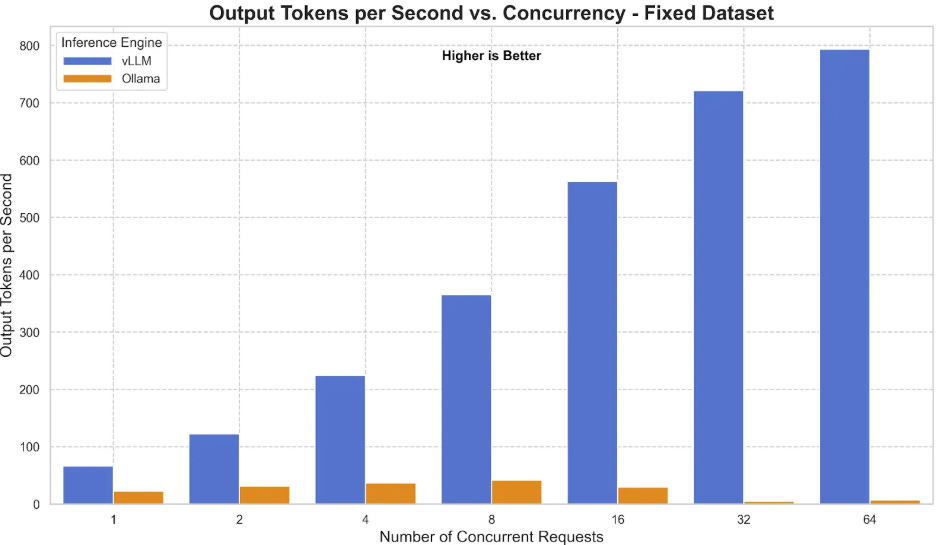
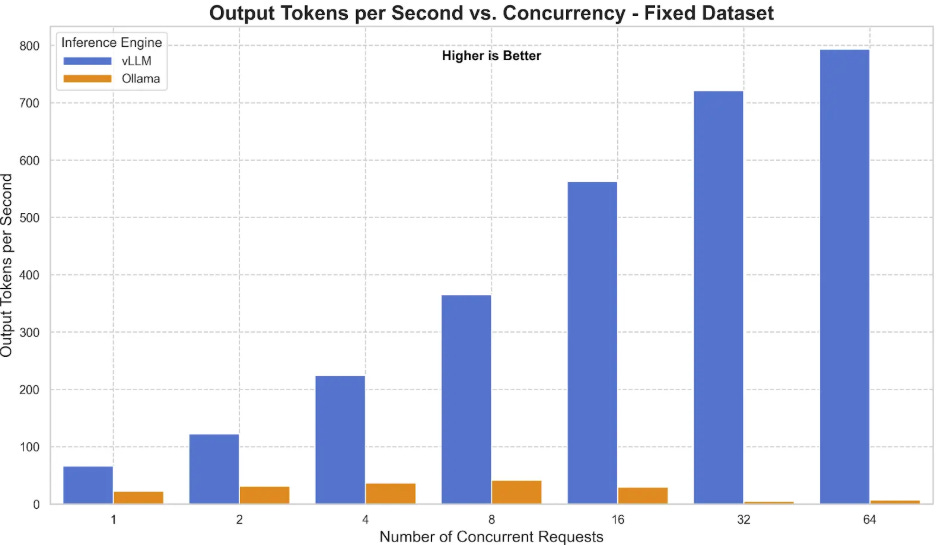 Link: https://developers.redhat.com/articles/2025/08/08/ollama-vs-vllm-deep-dive-performance-benchmarking#comparison_2__tuned_ollama_versus_vllm (View Highlight)
- Using vLLM allows you to serve the model via an OpenAI-compatible
/v1/chat/completionsAPI endpoint. When configured properly—such as setting themax_workersandconnection_pool_sizeappropriately in your SDK configuration to avoid 503 errors—vLLM ensures your pipeline can handle massive parallel OCR requests without crashing under load. (View Highlight) - The Optical Character Recognition (OCR) landscape is vast, but GLM-OCR stands out as a multimodal model specifically built for complex document understanding. (View Highlight)
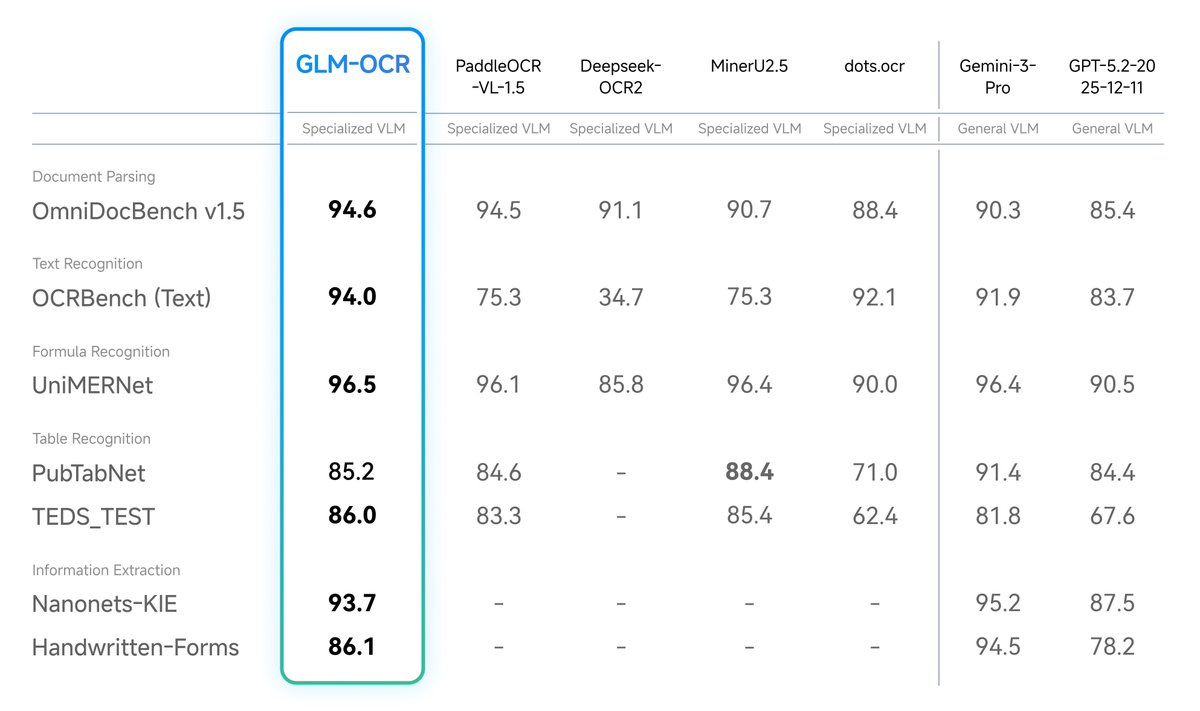
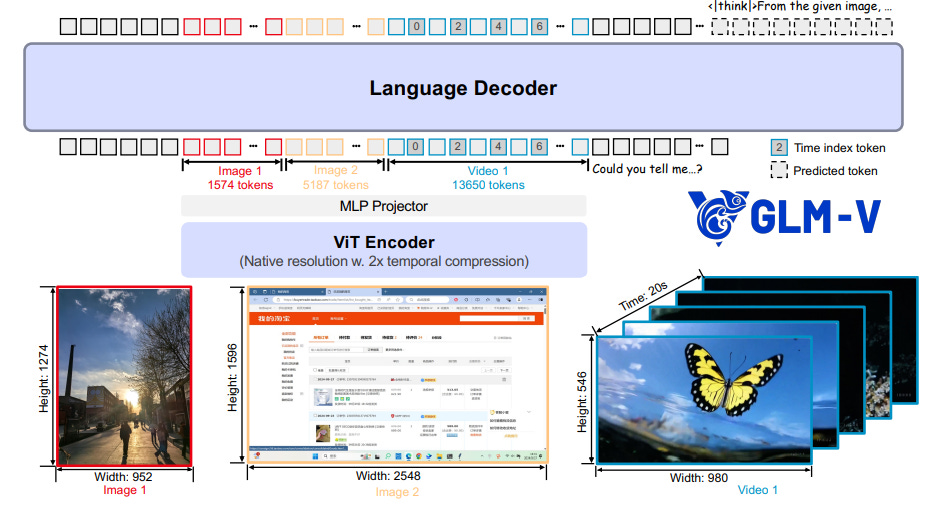
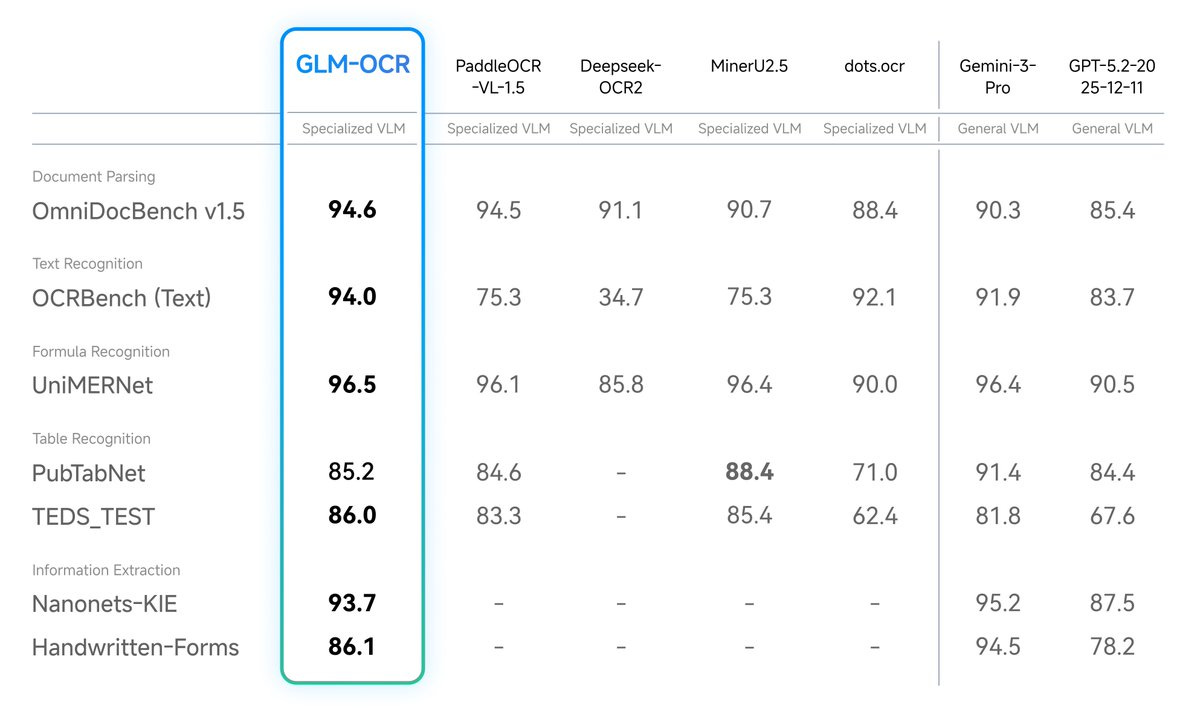
- Developed by Z.ai and based on the GLM-V encoder-decoder architecture, it introduces advanced training techniques like Multi-Token Prediction (MTP) loss and full-task reinforcement learning to drastically improve recognition accuracy. Instead of relying on massive, unwieldy models, GLM-OCR proves that highly focused architectures can dominate specific tasks. Despite its incredibly small size of just 0.9 billion parameters, GLM-OCR achieves a score of 94.62 on OmniDocBench V1.5, ranking #1 overall. This small footprint means it can run fully locally on standard consumer devices, like MacBooks or edge devices, without sacrificing capability. (View Highlight)
- It successfully rivals and often outperforms much larger, closed-source models across benchmarks for formula recognition, table extraction, and information extraction.
 (View Highlight)
 - The secret to this “small but mighty” performance is its two-stage pipeline, which pairs the language decoder with the PP-DocLayout-V3 layout detection model. By first analyzing the document layout and then performing parallel recognition, GLM-OCR maintains robust performance on highly complex real-world scenarios, including code-heavy documents, intricate tables, and documents with rotating or staggered layouts. (View Highlight)
- Running models locally with Ollama is perfect for testing, personal use, and CPU-only environments. However, as your document parsing needs grow, you must consider the transition from a local machine to a robust cloud infrastructure. Cloud deployments allow you to serve the pipeline at scale, making use of time-slicing Kubernetes (k8s) configurations and worker-server deployments for maximum efficiency. When moving to a production environment, the official GLM-OCR documentation strongly recommends transitioning to engines like vLLM or SGLang. These frameworks are specifically designed for high-concurrency services and provide significantly better performance and stability when you have access to one or multiple GPUs. (View Highlight)
- Before deploying, it is crucial to understand the ecosystem that makes local inference so accessible. At the core of this democratization is llama.cpp, a high-performance C++ engine designed to run LLMs on standard hardware with maximum efficiency.
While
llama.cppis incredibly powerful, it can require manual compilation and complex command-line arguments to operate. This is where Ollama steps in as the “user interface” and manager. Ollama acts as a user-friendly wrapper around the llama.cpp backbone, allowing developers to download models, manage memory, and serve a clean API with simple commands. It handles the underlying complexity, bringing powerful language models to developers who may not be machine learning engineers. To achieve this efficiency on local hardware, the engine relies heavily on quantization and the GGUF file format. Quantization shrinks the size of the model weights—such as using 2-bit (Q2) or 4-bit (Q4) representations instead of standard 16-bit floats—so the model can run on cheaper hardware without losing significant performance. (View Highlight)